SolarCalc21.45
Publisher Description
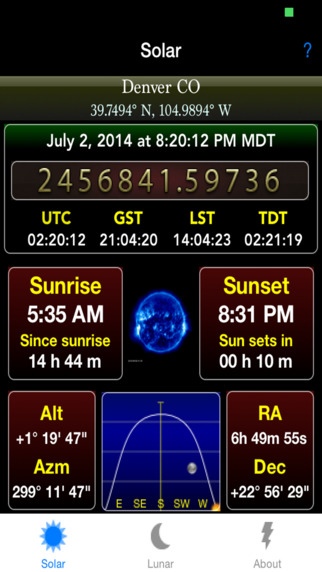
SolarCalc2 provides much more than just sunrise and sunset times. Explore the movements of the sun and moon. Find the shortest and longest day for any location. Easily view total monthly and daily daylight hours for any month or day. Also includes lunar rise and set times, lunar phases and other real-time lunar data, and more!
Use current GPS location or select from a list of cities or search for a location
Save locations to Favorites list
Sun rise and set times
Real-time sun Altitude and Azimuth
Real-time sun Right Ascension and Declination
Time since sunrise
Time since sunset
Time until sunrise
Time until sunset
Solar noon time
Total monthly and daily daylight
Monthly and daily sun transit times
Civil, Nautical and Astronomic twilight times
Solar Eclipse event dates and times
Interactive sun path chart for any day
Sun analemma chart for any time of day
Latest Sun images from the Solar and Heliospheric Observatory
Sunlight map for the current time
Equinox and Solstice date and times
Displays Julian Date
Displays UTC (Coordinated Universal Time), GST (Greenwich Sidereal Time), LST (Local Sidereal Time) and TDT (Terrestrial Dynamic Time)
Moon rise and set times
Real-time moon Altitude and Azimuth
Real-time moon Right Ascension and Declination
Time since moon rise
Time since moon set
Planets rise and set times
Real-time planets Altitude and Azimuth
Real-time planets Right Ascension and Declination
IOS 8.0 Widget
Requires iOS 7.1 or later. Compatible with iPhone, iPad, and iPod touch.
About SolarCalc2
The company that develops SolarCalc2 is Kirk Boyd. The latest version released by its developer is 1.45.
To install SolarCalc2 on your iOS device, just click the green Continue To App button above to start the installation process. The app is listed on our website since 2014-08-15 and was downloaded 46 times. We have already checked if the download link is safe, however for your own protection we recommend that you scan the downloaded app with your antivirus. Your antivirus may detect the SolarCalc2 as malware if the download link is broken.
How to install SolarCalc2 on your iOS device:
- Click on the Continue To App button on our website. This will redirect you to the App Store.
- Once the SolarCalc2 is shown in the iTunes listing of your iOS device, you can start its download and installation. Tap on the GET button to the right of the app to start downloading it.
- If you are not logged-in the iOS appstore app, you'll be prompted for your your Apple ID and/or password.
- After SolarCalc2 is downloaded, you'll see an INSTALL button to the right. Tap on it to start the actual installation of the iOS app.
- Once installation is finished you can tap on the OPEN button to start it. Its icon will also be added to your device home screen.
